Unattended MAPS Server Installations
MAPS supports automatic database configuration via a command file, enabling unattended installs of a MAPS Server without requiring the wizard.
Configuring a MAPS Server with Unattended Mode
Running MAPSDbConfig in Unattended Mode
Use the /commandFile (or /cf) flag to point MAPSDbConfig to a JSONC configuration file:

Building your Command File
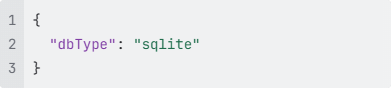
The command file uses JSONC format. The only required attribute is 'dbType', which specifies the database type ("sqlite" or "postgres").
Option 1 - Minimal SQLite Setup
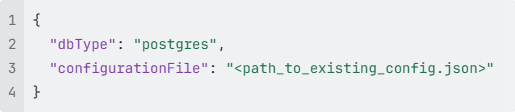
Option 2 - Join an Existing Postgres Cluster
Provide the path to an existing config.json file:
Option 3 - New Postgres Node & Database
Specify full server and database credentials:
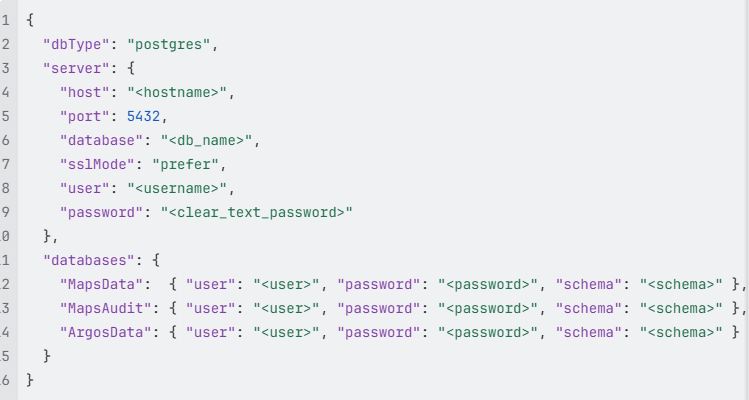
Note: Database users can be shared. For example, MapsAudit and ArgosData can use the same user as MapsData.
Using Encrypted Passwords
Each password field supports either a standard clear text password or encrypted (password-aes256), but not both. To generate an encrypted password:
Option 1 - With a dialog prompt

Option 2 - Directly from the command line
